A client tracker is a list with one row per client. For a B2B company the columns that matter are the money ones: what each client pays a month, how they are billed, whether they are active, signed but not paying yet, or at risk, and what share of your revenue they are. This page gives you a template to copy, a worked example with the arithmetic, and the point where a spreadsheet stops being enough.
A client tracker for a B2B company should answer five questions about revenue, all readable off the list in a minute. Most client trackers online are contact lists and answer none of them. These are the five questions a founder should be able to answer without opening a second tool:
Who pays me, and how much a month?
On what terms: monthly, annual or a one-off project?
Which clients are signed but not paying yet?
Which clients might leave?
How much of my revenue is the biggest client?
The last one is the one founders skip. If a single client is a third of revenue, losing it changes your runway overnight. The one customer too big post covers what to do about it.
Client tracker template you can copy
The client tracker template below is a table with eight columns: client, monthly revenue, billing frequency, status, start date, renewal or notice date, share of MRR and notes. Select it, paste it into a spreadsheet, and add one row per client. The example row is fictional.
Client
Monthly revenue
Billing frequency
Status
Start date
Renewal or notice date
Share of MRR
Notes
Example Co
€5,000
Monthly
Active
2026-03-01
2027-03-01
10%
Notice period 60 days
How to fill each column:
Client: the company name, not the person. One row per paying entity.
Monthly revenue: what you earn from them each month. For an annual contract, divide the yearly fee by 12 so every row is comparable.
Billing frequency: Monthly, Annual or One-time. A one-time project is real money but not recurring, so it stays out of MRR.
Status: Active (paying now), Expected (signed, first payment ahead), At risk (might leave) or Lost (kept for history). Change it the day it changes.
Start date: when billing began. It tells you how long a client has stayed.
Renewal or notice date: when the agreement renews or the last day the client can give notice. This is the date you want to see 90 days ahead.
Share of MRR: monthly revenue divided by total MRR, for Active rows only. In a spreadsheet, a formula such as =B2/SUMIF(D:D,"Active",B:B) does it.
Notes: terms that change risk, such as a notice period, a discount ending or a client who has said they are reviewing suppliers.
The same sheet works as a customer tracker or a customer list template. Rename the first column if you prefer the word customer.
Worked example: ten clients, one decision
This worked example uses a 12-person agency with ten clients, €120,000 in the bank and €52,000 of monthly costs, and shows how the tracker turns client rows into MRR, top-client share and runway. The figures are invented to show the arithmetic.
Client
Monthly revenue
Frequency
Status
Share of MRR
Brightline
€16,000
Monthly
Active
33%
Corvid
€9,000
Monthly
Active
19%
Delta Freight
€7,000
Monthly
Active
15%
Elm and Oak
€6,000
Monthly
Active
13%
Fathom
€5,000
Monthly
Active
10%
Granite Labs
€3,000 (€36,000 a year)
Annual
Active
6%
Harbor Print
€2,000
Monthly
Active
4%
Ivy Legal
€3,500
Monthly
At risk
not in MRR
Juniper
€6,000
Monthly
Expected
not in MRR
Kestrel
€10,000 once
One-time
Active
not in MRR
Now the arithmetic, one line at a time.
MRR = 16,000 + 9,000 + 7,000 + 6,000 + 5,000 + 3,000 + 2,000 = €48,000
(Ivy, Juniper and the one-off Kestrel project are left out)

top client share = 16,000 / 48,000 = 33%
at-risk revenue  = €3,500 a month (Ivy Legal)
expected pipeline = €6,000 a month (Juniper)

net burn = costs - MRR = 52,000 - 48,000 = €4,000 a month
runway   = cash / net burn = 120,000 / 4,000 = 30 months

without Brightline:
MRR      = 48,000 - 16,000 = €32,000
net burn = 52,000 - 32,000 = €20,000 a month
runway   = 120,000 / 20,000 = 6 months
Read it like this. The agency looks safe at 30 months, but one client is 33% of MRR, and without it the runway is 6 months. If Juniper starts paying, MRR rises to €54,000 and the company breaks even. If Juniper starts and Brightline leaves, MRR is €38,000, net burn is €14,000 and runway is 120,000 / 14,000 = 8.6 months. Ivy Legal matters less than it feels like: it is already outside MRR, so losing it changes nothing in the runway, while keeping it would add €3,500 a month. The tracker shows where the exposure is. For the same maths on your own numbers, use the MRR calculator, and see when will I run out of cash for what to do with the runway figure.
What is MRR explains why one-time and not-yet-paying clients stay out of it.
When a spreadsheet is enough
A spreadsheet is the right client tracker when you have fewer than about 20 clients, one person updates it, and you open it at least monthly. The template above is a few minutes of setup and costs nothing. Beyond those limits it breaks in predictable ways, listed below.
The usual failures:
The status column goes stale because nobody owns it, and at-risk clients stay marked Active.
The share formula breaks when a row is inserted or a client is renamed.
The sheet shows revenue but not what it does to runway, so the number never reaches a decision.
A second copy appears in someone's drive.
If you recognise two of those, move the list somewhere that connects clients to cash and burn.
What a CRM does that a client tracker does not
A CRM manages relationships and sales work: contacts, follow-up reminders, email history, and deals moving through stages such as lead, proposal and closed. A money-side client tracker has none of that. It cannot tell you who to call this week or which proposal is stuck.
If follow-ups and deal stages are what you need, use a CRM. Several are well run and which one fits depends on your team size and how you sell, so pick by trying two or three. Many companies run a CRM for the conversation and a client tracker like this one for the revenue.
How Plainhub tracks the money side of your clients
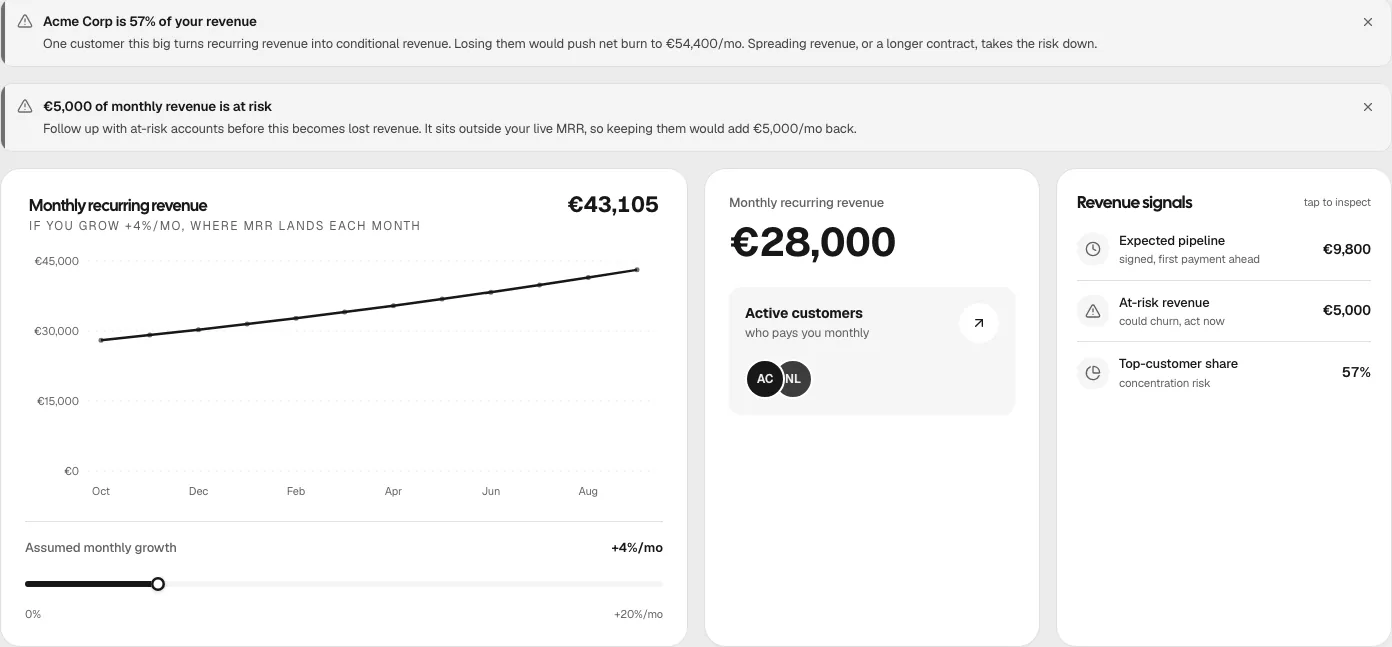
Plainhub's Revenue page is a client list built around the five questions above. Each customer has a name, monthly revenue, a frequency (Monthly, Annual or One-time), an expected payment date and a status: Active, Expected, At risk or Lost. From that list the page works out the rest:
MRR counts Active customers on a monthly or annual plan, plus income you logged as recurring. One-time deals stay out.
Expected customers show as pipeline that is not yet in MRR.
At-risk revenue is excluded from MRR and shown as its own figure, so you see what keeping the client would add back.
Each customer has a share of MRR, and a warning appears when the top customer is 30% or more of it. It also states what net burn would become if you lost them.
A payment that is late turns red and an alert names the amount outstanding. A Paid button on that row confirms it arrived.
Revenue page, sample workspace: the concentration warning, at-risk alert, MRR, expected pipeline and top-customer share. The chart is a projection at an assumed monthly growth that you can change.
Because the same numbers feed cash, burn and runway, marking a client At risk changes the runway you see straight away. That connection is what a spreadsheet tracker lacks. Read how it fits with cash and team cost on the startup financial dashboard page.
What Plainhub does not track
No contacts, follow-ups or emails.
No deal pipeline stages.
No invoices and no payment tracking beyond an expected date and a Paid button.
No start date, renewal date or notes field on a customer. Keep those in your own sheet if you need them.
No bank or accounting connection. It knows only what you record.
Pricing and how to try it
Pro is €29.99 a month and Max is €59.99 a month. There is no free trial. The live demo on the homepage runs the same app on a sample workspace with no signup, including the Revenue page shown above.
Client tracker questions
What is a client tracker?
A client tracker is a list of the clients you work with and the facts you need about each one. For a B2B founder the useful version records what each client pays per month, how often they are billed, whether they are active, signed but not yet paying, or at risk, and when the agreement renews. It is a simpler thing than a CRM.
How do I keep track of clients?
Keep one row per client with monthly revenue, billing frequency, status, start date, renewal or notice date and share of total revenue. Update the status the day it changes, and add up the rows once a month to get MRR, at-risk revenue and the share of your biggest client. A spreadsheet is enough for the first ten to twenty clients.
Where can I get a client list template?
The template on this page is a copyable table with eight columns: client, monthly revenue, billing frequency, status, start date, renewal or notice date, share of MRR and notes. Paste it into a spreadsheet and add a row per client. It tracks revenue and risk, so it does not include contact details or a follow-up log.
What is the difference between a client tracker and a CRM?
A client tracker records what each client is worth and how safe that revenue is. A CRM records conversations: contacts, follow-ups, emails and deals moving through stages. Many small companies need both. Plainhub covers the money side only and has no contacts, follow-ups, emails, deal stages or invoices.
What is client tracking software?
It is software that holds your client list and shows something useful about it. CRM tools track relationships and sales activity. Plainhub's Revenue page tracks the money: monthly revenue per client, status, MRR, expected pipeline, at-risk revenue and a warning when one client is 30% or more of MRR.
Is there a free client tracker app?
The template on this page is free and works in any spreadsheet. Plainhub has no free plan: Pro is €29.99 a month and Max is €59.99 a month, and there is no free trial. The live demo on the homepage runs a sample workspace with no signup, so you can try the Revenue page before paying.
See who pays you and how exposed you are
Add your customers and the Revenue page works out MRR, pipeline, at-risk revenue and concentration. Try the demo first if you want to look around.